
For developers using Bricks Builder, you already have a significant advantage thanks to the builder’s modern architecture.
In this article, we’ll explore how to optimize Bricks Builder sites specifically for local search dominance, focusing on performance, semantic HTML, and the correct integration of maps.
Lightning-Fast Load Times with Bricks
Google’s Core Web Vitals (CWV) are a confirmed ranking factor, and they are particularly impactful in mobile local search, where users are often searching on the go with varying network speeds. A slow-loading site will quickly lead to bounces, signaling to Google that your site doesn’t satisfy the user’s local query.
Bricks Builder is inherently fast. It outputs incredibly clean DOM structures and avoids the massive CSS/JS payloads typical of older page builders. To maximize this for Local SEO:
1. Leverage Bricks’ Built-in Performance Features
Ensure you have enabled Bricks’ performance settings:
- External CSS: Load CSS via external files rather than inline to allow browser caching.
- Disable WP Embeds & Emojis: Remove unnecessary WordPress core bloat that slows down page parsing.
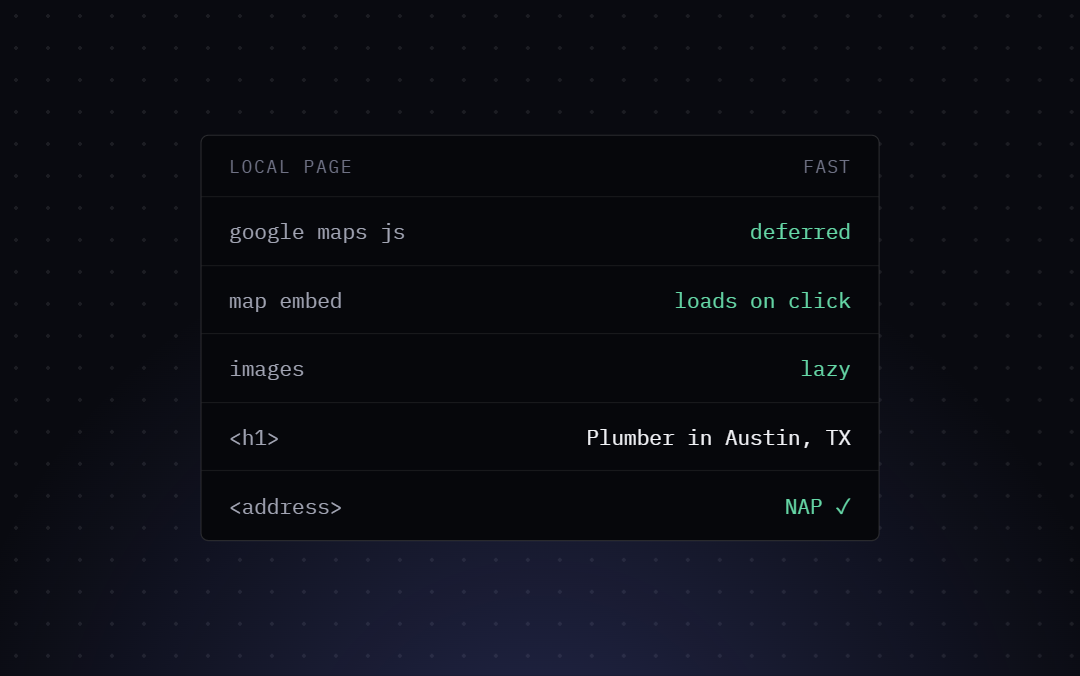
- Lazy Load Images: Bricks has native lazy loading. Ensure this is active, especially for heavy hero images on local landing pages.
2. Optimize Local Assets
Local sites often feature high-resolution images of the storefront or previous work. Use modern formats like WebP or AVIF. If you are displaying a map, consider loading it conditionally or deferring the JavaScript initialization until the user scrolls near the map element. This prevents the heavy Google Maps API from blocking the initial page render.
Semantic HTML Structure for Local Relevance
Search engine crawlers rely on HTML tags to understand the hierarchy and context of your content. Bricks gives you complete control over your HTML output, allowing you to craft a perfectly semantic document outline.
1. Proper Heading Hierarchy
Your H1 should clearly state the core service and the primary location (e.g., <h1>Emergency Plumber in Austin, TX</h1>). Subsequent H2s should support this (e.g., <h2>Our Plumbing Services</h2>, <h2>Service Areas Near Austin</h2>).
In Bricks, always verify that your heading elements are actually using the correct HTML tags (<h1-h6>) and aren’t just stylized <div> elements.
2. Utilizing the <address> Tag
The <address> tag is specifically designed to provide contact information for the nearest article or body ancestor.
When building your footer or a contact section in Bricks, wrap your NAP (Name, Address, Phone) data within an <address> element. This provides a strong semantic signal to search engines.
<address>
  <strong>Bricks Plumbing Experts</strong><br>
  123 Main St, Suite 100<br>
  Austin, TX 78701<br>
  <a href="tel:+15551234567">(555) 123-4567</a>
</address>
You can easily achieve this in Bricks by changing the HTML tag of a Basic Text or Rich Text element to custom and typing address.
Integrating Google Maps the Right Way
Embedding a Google Map is standard practice for local business websites, but doing it incorrectly can harm both performance and SEO.
Avoid the Standard iframe Embed (If Possible)
While dropping a Google Maps <iframe> into a Bricks code block is easy, it loads multiple external resources immediately, hurting your PageSpeed score.
The Optimized Approach: Interactive Placeholders
A better strategy for local SEO and performance is to use a static image of the map as a placeholder. You can generate a static map image using the Google Maps Static API.
- Place the static image in a Bricks Image element.
- Wrap the image in a link pointing to the business’s Google Maps CID (Customer ID) URL or their Google Business Profile URL.
- Alternatively, use a lightweight JavaScript snippet to swap the static image with the actual interactive iframe only when the user clicks the image or scrolls it into view.
This approach drastically improves initial page load times—a crucial local ranking factor—while still providing the geographic relevance and user experience expected on a local business site. By combining Bricks Builder’s lean output with strategic semantic HTML and performance optimizations, you create an incredibly strong foundation for local search success.