
What to export, what to keep, and how to avoid duplicate meta tags when migrating to a native Bricks solution.
Traditional SEO plugins like Yoast and Rank Math are phenomenal tools. They introduced millions of WordPress users to technical SEO. However, they were built for the classic editor and Gutenberg. They look at stored post_content, count keywords, and calculate readability scores based on text stored in the database.
When you build a site in Bricks Builder, your content lives in a structured JSON array. Traditional plugins can’t “see” your text, leading to 0/100 readability scores and auto-generated meta descriptions that scrape raw shortcodes or empty strings.
Moving to Bricks SEO fixes this, but migrations can be scary. Here is the exact playbook for moving off legacy SEO plugins without losing your rankings.
Preparing for the Migration
Before you deactivate your old plugin, take a deep breath. SEO data lives in two places:
- Global Rules: Your settings for how archives and titles behave globally.
- Post Meta: The hand-typed descriptions and titles on individual pages.
Bricks SEO is designed to safely inherit your post meta — without touching or deleting your old plugin’s data.
Step 1: Run the Built-In Importer
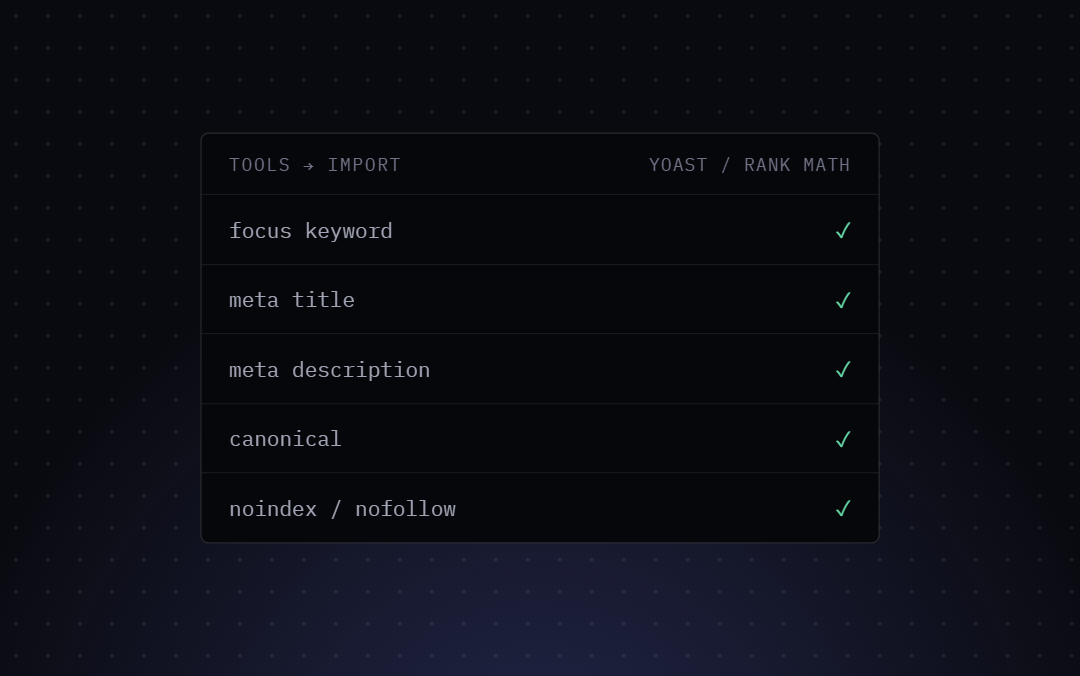
When you first activate Bricks SEO, do not deactivate Yoast or Rank Math yet. Go to Bricks SEO → Settings → Tools. If either plugin is active, you’ll see an “Import from Yoast SEO” or “Import from Rank Math” button.
Click it. The importer scans your wp_postmeta table and copies over:
- Meta titles
- Meta descriptions
- Focus keywords
- Canonical URL overrides
- Noindex/nofollow flags
Two rules make this safe to click without thinking twice:
- It only fills in empty fields. If a page already has a value set in Bricks SEO — even one you typed five minutes ago — the importer skips it. Nothing you’ve already configured gets touched.
- It never reads from or deletes your old plugin’s data. The importer only copies; it doesn’t migrate in the destructive sense. Your Yoast or Rank Math data stays exactly where it is, so there’s no risk in running the importer, checking the results, and running it again later.
On a large site the importer processes up to 300 posts per click. If you have more than that, the result message tells you so — just click the button again to pick up where it left off (already-imported posts are skipped automatically, since their fields are no longer empty).
Step 2: Auditing Your Global Tokens
Traditional plugins use their own proprietary shortcodes (like %%title%% or %post_title%). Bricks SEO uses standard dynamic tokens like Moving from Yoast or Rank Math to Bricks SEO, Bricks SEO, and {sep}.
The importer only copies per-page values — it doesn’t touch your global title/description templates, since those are a site-wide default, not something stored per post. Go to Bricks SEO → Settings → Templates to verify your site-wide and per-post-type defaults are set up the way you want, using the real token list: Moving from Yoast or Rank Math to Bricks SEO, Bricks SEO, {tagline}, {sep}, {excerpt}, Bricks SEO, {category}, {tag}, {date}, {modified}, {post_type_plural}.
Step 3: Deactivating the Bloat
Once your data is imported and your global settings are verified, you can safely deactivate and delete Yoast or Rank Math.
Wait, won’t I lose my sitemap? No. Bricks SEO natively generates a lightning-fast, cached XML sitemap that seamlessly takes over the /sitemap_index.xml route. Search engines checking your site won’t notice a difference in structure, but they will notice the speed.
Step 4: Watch Your Source Code
Clear your site cache (LiteSpeed, WP Rocket, Redis, etc.). Open your homepage in an incognito window, right-click, and “View Page Source.” Search for <title> and <meta name="description".
You should see clean, singular tags generated by Bricks SEO. By removing the old plugins, you’ve just stripped thousands of lines of legacy PHP execution off every page load. Your Bricks site is now running lean, native SEO.