
The Five-Tier Fallback Chain, Explained
How a title is chosen when a page, a template, and the site all have an opinion.
Open a page built with Bricks and look at the post content in the database. You will find very little — the layout lives in structured data that Bricks turns into markup when the page renders. Most SEO plugins were written before that model existed, causing disconnects between the page you build and the data search engines see.
One of the biggest areas this causes friction is metadata generation — specifically, titles and descriptions. If a global setting says your title should be “Post Name – Site Name,” but you also typed a custom title on the page itself… who wins?
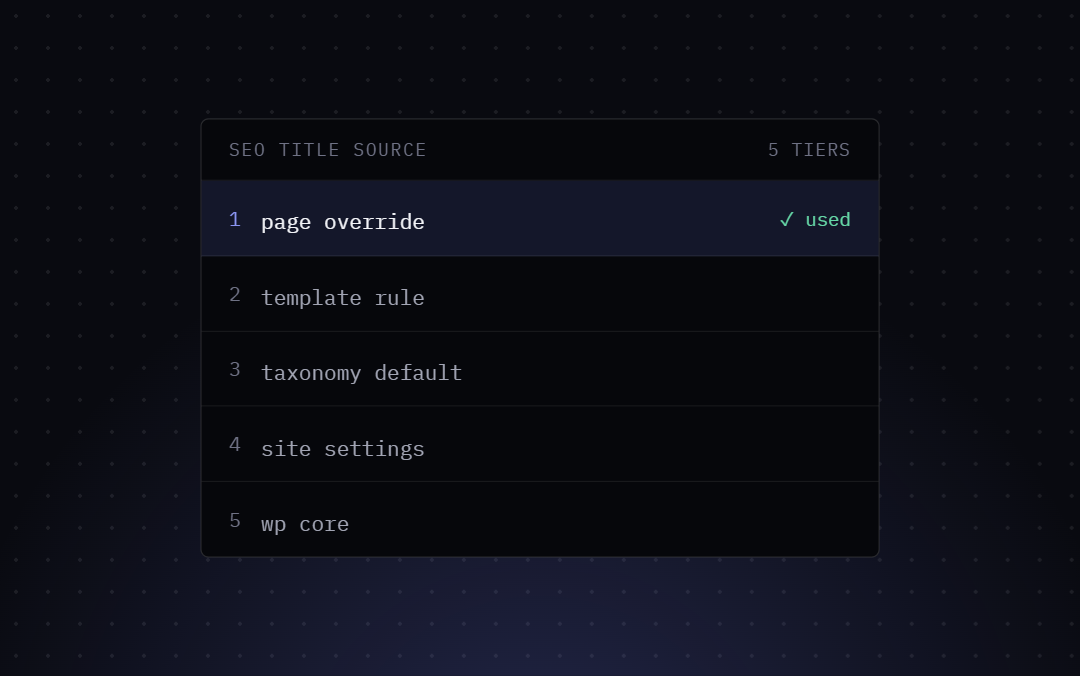
In Bricks SEO, we solved this with the Five-Tier Fallback Chain.
How the Chain Works
Bricks SEO evaluates five tiers from the most specific to the broadest, stopping the second it finds a value:
Tier 1 — Post meta. If you’ve typed a title or description into the Bricks SEO panel on that specific page, it wins over everything else.
Tier 2 — Bricks’ own page settings. If tier 1 is empty, Bricks SEO checks whether Bricks’ own built-in page-settings title (set in Bricks’ own page settings, not the SEO panel) has a value.
Tier 3 — The content-type template. If tiers 1–2 are empty, the plugin falls back to the title/description template configured for that specific post type under Settings → Templates.
Tier 4 — The site-wide template. If there’s no per-post-type template either, it falls back to your global default — the safety net for every post type you haven’t individually configured.
Tier 5 — WordPress core. In the rare case every tier above is empty, Bricks SEO falls back to WordPress’s own native title or excerpt, so the page never ships with an empty <title> tag.
Why This Matters for Bricks Builder
This chain isn’t just theoretical — it’s visible. The panel shows you the resolved value live as you type, so you can see immediately whether your override is taking effect. (It doesn’t currently label which tier a value came from — just the result.)
The chain runs on every render, so a change in a higher tier takes effect immediately. Nothing is copied down into lower tiers.
To override a value for a single page: open it in the Bricks builder, select the SEO tab, and type a value. To hand control back to the next tier, just clear the field.