
Title templates that don’t repeat themselves
Tokens, separators and length, with patterns you can confidently paste.
We have all seen it in the search results: About Us – My Studio – My Studio.
Duplicate brand names in a <title> tag look amateurish and waste precious pixel space on Google’s results page. This happens when global SEO settings append a site title, but the Bricks template also appends it, or an author hardcodes it.
Bricks SEO prevents this through the Fallback Chain, but setting up your baseline title templates correctly is the first step to clean SERPs.
Understanding Tokens in Bricks SEO
Tokens are dynamic placeholders. Instead of typing a static title, you use tokens wrapped in curly braces that Bricks SEO fills in on the fly: Title templates that don’t repeat themselves, Bricks SEO, {sep}, {tagline}, {excerpt}, Bricks SEO, {category}, {tag}, {date}, {modified}, and {post_type_plural}.
Two Bulletproof Title Templates
If you’re setting up a new Bricks site, go to Bricks SEO → Settings → Templates and paste these patterns.
1. The Standard Post/Page Template
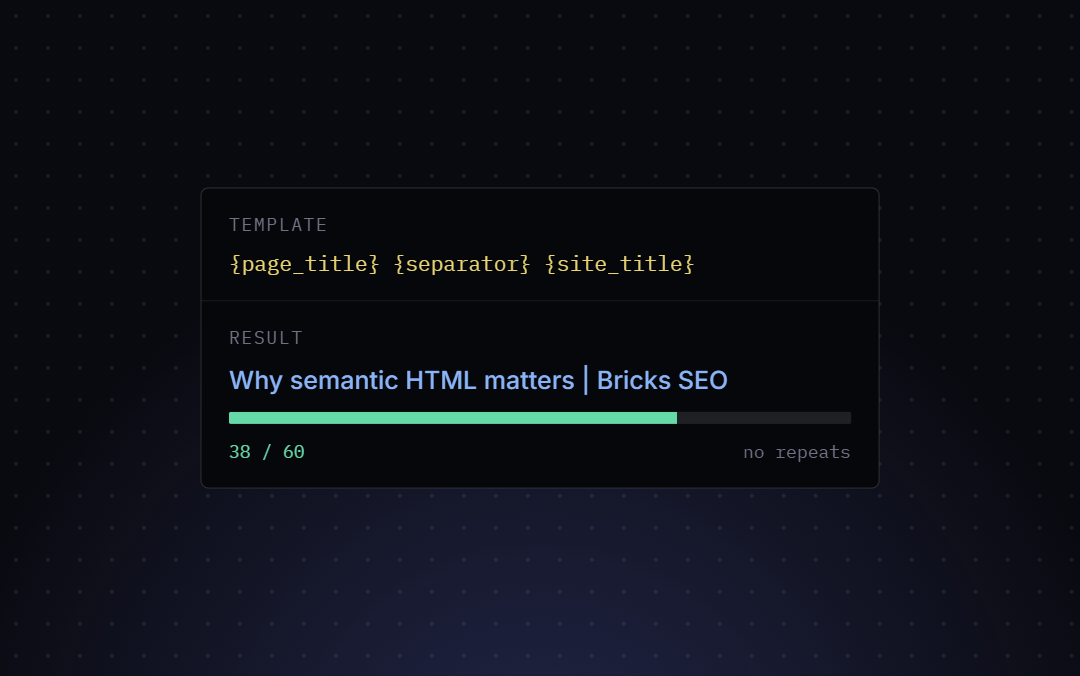
Pattern: Title templates that don’t repeat themselves {sep} Bricks SEO
Example output: Why semantic HTML matters | Bricks SEO
This is the gold standard. It puts the most relevant keyword (the post title) at the very front where users and bots look first, and appends your brand at the end for authority.
2. The Product Template (WooCommerce)
Pattern: Title templates that don’t repeat themselves – Buy Online {sep} Bricks SEO
Example output: Leather Wallet – Buy Online | Bricks SEO
Set this under the “product” row in Settings → Templates if you’re running a WooCommerce store.
A Note on Archives
Archive titles (category, tag, author) aren’t template-configurable today — they’re generated automatically as {Term or Author name} {sep} {Site title}. If you need a different pattern for archives specifically, that’s not currently possible.
Testing Your Templates
A title tag should ideally be between 50 and 60 characters. Any longer, and Google will truncate it with an ellipsis.
Inside the Bricks SEO panel’s Preview tab, you’ll see a live SERP preview that visualizes exactly how your tokens render on Google. If your title is too long, you’ll see it get cut off — shorten the post title, or manually type a custom SEO title for that specific page.
Keep your global templates simple, rely on tokens, and only manually override when a specific page needs an edge.